Create Watercolor-Style Artwork with AI: Turn Simple Prompts into Artistic Visuals
If you want to create wall decor, posts for social networks, or any other type of illustrations, then AI will help you do so with the least amount of time and effort required.


New Delhi:The method of painting with watercolors was always associated with some kind of romance – the softness of borders, gradual transition of shades, and uncertainty. But what if I told you about the possibility of making the same image but without spending so much time on it as is needed for making classical artworks? Thanks to the emergence of technologies such as AI models like GPT image 2, watercolor painting based on textual information has become very simple.
If you want to create wall decor, posts for social networks, or any other type of illustrations, then AI will help you do so with the least amount of time and effort required.
Discover below the ways to use AI technology to create stunning visuals.
Why use watercolor style in your designs?
In today’s world of high-contrast, pixelated graphics, the watercolor style adds warmth and uniqueness to your designs.
The key features that make it stand out include:
- Organic and smooth gradients
- Irregular lines and strokes for added texture
- Handcrafted look
Thus, watercolor-inspired images are ideal for creative applications that require warmth and subtlety.
From Imagination to Effect on the Brush Stroke
When painting with AI, do not hope for precision, but use the power to tame the chaos and give a very descriptive instruction for your painting.
If the term “watercolor painting” comes to your mind, try to be more specific and ask yourself:
- What picture are you going to paint?
- What mood is required from the picture?
- What color scheme does the picture follow?
Understanding the principles of how the GPT image 2 works can greatly facilitate your efforts, as words such as “soft washes,” “blended pigments,” and “paper texture” will help you a lot.
Choosing appropriate themes for watercolor images
Subjects are not all equally suitable for creating watercolors with the help of artificial intelligence. However, some topics may work well.
Some of the topics that you could try to create paintings about include the following:
- landscapes with flowers, mountains, seas
- portraits of humans with soft lighting and pastel colors
- abstract paintings with fluid colors
Such topics will definitely make your paintings more beautiful.
Usefulness of watercolor AI design art in a creative way
Once you have designed watercolor pictures using an AI tool, you will come up with so many ideas about how to use them in a creative way.
They can include the following:
- Interior design artwork
- Instagram posts
- Greetings or invitations cards
- Soft backgrounds on websites
The versatility of watercolor art makes it possible for application to multiple platforms.
Mix colors, paint words: Watercolor art with Dreamina
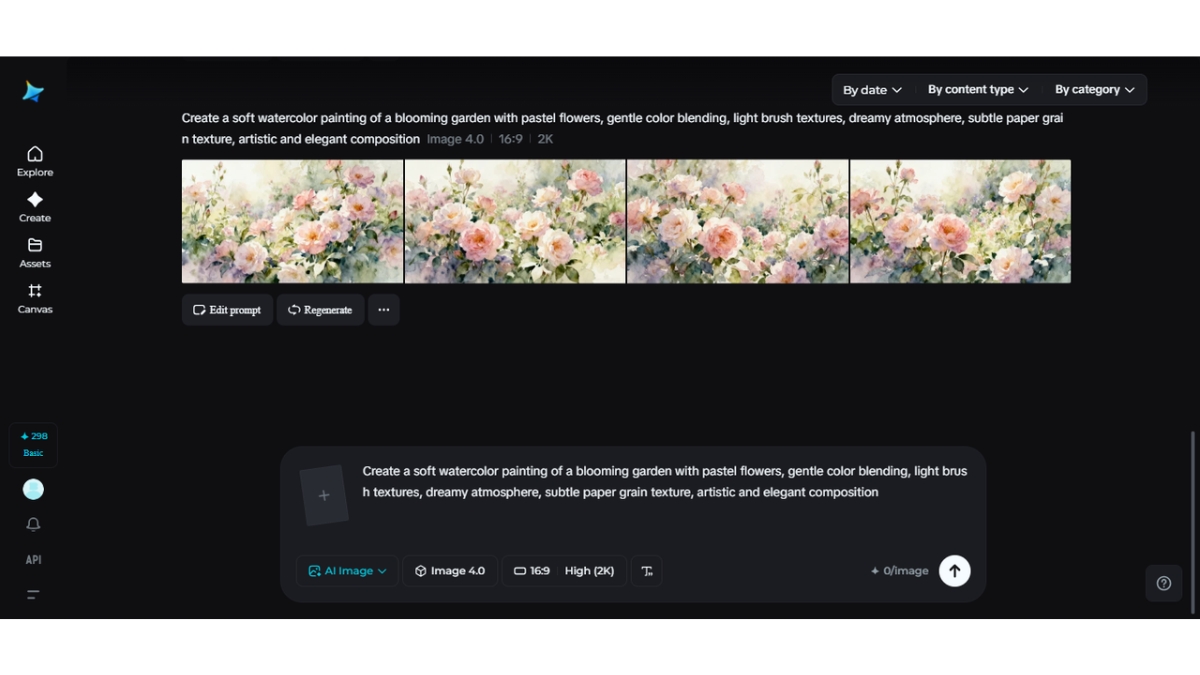
How to use GPT image 2 for maximum effectiveness? This is made easy by Dreamina through the following steps in its process workflow from concept to reality:
Step 1: Open Dreamina and click on the “AI Image” button
First, launch Dreamina and select the “AI Image” function available on the main page. Finally, select the option “Upload” and upload any image that you want to manipulate in your computer. Finally, enter a prompt in the dialog box provided below.
Step 2: Create the AI image
Next, choose AI model GPT Image 2 and choose the appropriate resolution and dimensions of the image. Click on the “Enter” button to create an image.
Step 3: Download the realistic image
Dreamina will generate four images for you to select from. Select the image that suits you best and then edit it through options such as inpaint, remove, and other similar ones. Finally, tap the “Download” button in the upper-right corner of your screen.
Deepening the artwork with softness
As mentioned above, watercolor art involves working not only with individual colors but also with their relationships. Even slight tweaks to prompts can yield significant results.
Pay attention to:
- Smooth light transitions rather than stark contrasts
- The layering technique for creating depth
- Soft textures resembling genuine paper
Such techniques will enable your AI-created artwork to have a more convincing feel.
Experimenting with color palettes suitable for the style
Color is an essential part of watercolor design. Unlike digital graphics with bold designs, watercolor relies on harmony.
It is worth trying:
- Pale shades for a calm and soothing appearance
- Earth tones to give a natural look
- Monochrome color palette for elegance
Testing different palettes may help you find a tone to complement your artistic concept.
Reiterating ideas without starting anew
Flexibility is one of the greatest benefits of using AI technology. In case the output does not satisfy you, there is no need to start all over again. You may try to alter it.
For example, you can modify:
- The atmosphere from vibrant to dull
- The object while preserving the overall design
- The composition
Thanks to the free GPT image 2 model, experimenting becomes effortless and affordable. Dreamina provides free GPT Image 2 experience with its daily free credits.
Creating hand-painted watercolor visuals
Although the artwork is created by an AI algorithm, you can make it look more hand-painted.
Some of the things that you can include in your painting include:
- Irregular brush marks
- Blended colors
- Texture of paper
These elements will help increase the authenticity of your paintings.
Turning simple prompts into artworks
The essence of watercolor AI designs is their unpredictability. In spite of your prompt, AI design will create the element of creativity within it.
The collaboration between a human prompt and AI design will yield:
- Novel visual designs
- Unique artistic interpretations\
- Surprise element
Watercolor AI designs offer you freedom of creation.
Balancing your designs visually
Despite the fluidity of watercolor painting, visual balance is crucial. A well-balanced design will create a sense of completion.
Look at:
- Placements of major visual elements
- Color distribution within the canvas
- Negative space usage
This approach will improve your design.
Conclusion: Create gentle artistic images using AI
Watercolor art conveys emotions and dynamics, as well as aesthetics. However, it is a good thing that Dreamina’s GPT picture 2 generator lets one create beautiful watercolors in minutes without a brush or other materials.
On the one hand, one can experiment and select the necessary colors and techniques to employ. In other words, one should not miss the chance to create watercolor images either for personal or business purposes. In any case, all one needs to do is provide a description to observe the process of creating an image from nothing.

Related News