Guide to TS property registrations (non-agri)
Slot booking for registration of non-agri properties started on Friday; here is the user manual for availing the service without hassles


1) Steps needed to be followed for updation of details and slot booking
• Go to https://registration.telangana.gov.in
• Select non-agriculture and you will be directed to the home page. Click slot booking
• You will be directed to login page
• If you are a new user, click ‘Register Here’ button
• You will be directed to another page to enter name, mobile number and click ‘Get OTP’
• OTP and password will be sent to the mobile number. Enter OTP, password, captcha and click ‘Register’
• Click to login after confirmation of registration
• After login, you will be directed to a screen to select slot booking from the left side menu
• You will be directed to a screen for select transaction type, transaction sub type, property type and local body
• Based on the options selected, fields to capture information vary
• Select all fields and click ‘Save and Continue’
• You will be directed to property details screen
• Enter PTIN number and click ‘Get Details’. Details are prepopulated
• Enter all mandatory fields and click ‘Save and Continue’
2) Property type
• If property type is selected as apartment and local body as Municipal Corporation/Municipality, a screen will be displayed. Enter all details and click ‘Save and Continue’
• If property type is selected as unit in commercial complex and local body as Gram Panchayat, a screen will be displayed
• You will then be directed to market value screen
• Based on locality and property type entered, market value and structure value. Rate is pre-populated as per government rates. Enter plot area in square yards and built-up area in square feet
• Market value of property is calculated and displayed
• Enter consideration value. Stamp duty is calculated on market value/consideration value whichever is higher. Click ‘Save and Continue’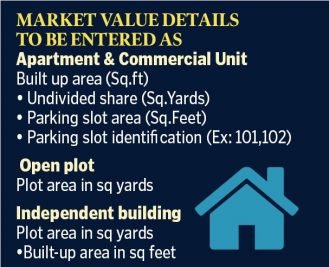
• You will be directed to seller details page. Select seller type from the drop down (Individual, HUF, firm, company, others). Based on type of seller, fields for capturing information vary
• Enter all fields and click ‘+ Seller’ button to add seller details
• Then click ‘Save and Continue’
• Note: If you have PAN number, enter it. If you do not have it, select Form 60/61 from drop down menu
• You will be directed to buyer details page. Select buyer type from the drop down (Individual, HUF, firm, company, others). Based on type of seller, fields for capturing information vary. Enter all fields and click ‘+ buyer’ button to add seller details. Then click ‘Save and Continue’
• Note: If you have PAN number, enter it. If you do not have it, select Form 60/61 from drop down menu
• You will be directed to buyer family details screen. If buyer has family, select ‘YES’ from drop down menu and add name, Aadhaar number, age, mobile number and relationship to the owner
• Click ‘Add/Edit Family Member’ tab to add other family members. Click ‘Save and Continue’
• Click ‘Draft Transaction Summary’ and download
• You will be directed to a screen to click ‘Add Witness’ button after which a pop-up will be displayed to enter witness details
• Minimum of two witness details to be saved
• Then witness confirmation message is displayed
• After adding two witnesses, click ‘Download Deed Document’
• You will be directed to payment screen along with payment summary. Click ‘Proceed To Pay’
• You will be directed to payment gateway. Select and make online payment. Click generate echallan after which a receipt will be generated
• You will then be directed to slot booking
3) Slot booking
• Select date, click ‘Undertaking By Buyer’ and ‘Undertaking By Seller’
• Available slots are displayed
• Click desirable slot, and also ‘Confirm and Download’
• Alert message is displayed asking confirmation of date and time
• Slot booking confirmation message is displayed
• Download the following documents: Undertaking by seller, undertaking by buyer, booking advisory, transaction summary
• An SMS will be sent to seller and buyer
• Both buyer and seller will meet the registration operator on the appointment day with all relevant documents
Now you can get handpicked stories from Telangana Today on Telegram everyday. Click the link to subscribe.
Click to follow Telangana Today Facebook page and Twitter .

Related News